2025-12-11

This is the first question worth asking when discussing collaboration environments these days.
Many companies have adopted collaboration tools, yet struggle because they aren't using them in a way that truly fits their team. We've all experienced confusion when methods vary by project, or information silos form because different departments use different systems.
The root cause of these issues isn't the tools themselves, but rather the ‘team's working style’.
Teams exhibit distinct patterns and tendencies in how they work. Some teams, like those with a J-type tendency, maximize efficiency through clear structures, consistent processes, and systematic workflows. Others, like those with a P-type tendency, achieve higher performance through flexible flows, intuitive collaboration, and rapid adaptability.
This ‘work MBTI’ isn't just a simple analogy; it's a crucial benchmark for determining which collaborative environment will make a team most productive. Therefore, choosing a collaboration tool is no longer solely about comparing features; the core decision factor is now, “Which approach best fits our team's style?”
From this perspective, the collaboration tools most frequently mentioned in business settings are Atlassian's Jira and Trello. These two collaboration tools, each with distinct purposes and features, reveal different strengths depending on a team's work style.
Let's compare the core features and intended uses of these two leading collaboration tools to determine which better suits our team's work MBTI and structure. Furthermore, we'll delve deeply into complementary usage strategies where Jira and Trello combine to create powerful synergy.
✔️ Purpose of Use
- Manage complex projects with clear structure and track task/issue progress at a glance
- Flexibly configure workflows to align with team processes, ensuring stable workflow operations
- Maintain consistent task handling by incorporating roles, priorities, and approval conditions into workflows
✔️ Features
- Provides phased project management features like sprints, backlogs, and epics → Supports agile projects
- Build robust development workflows: Create diverse processes using add-ons (e.g., Confluence, JSM)
- Sophisticated analytics: Supports agile reports, actionable metrics, and diverse visualization tools
- Centralized management of issue tracking, scheduling, risk management, and more → Ideal for medium to large-scale projects
✔️ Suitable Team Profiles
- Preferred by J (Judging) / TJ (Judging-Turning) oriented teams
- Organizations prioritizing structure, accuracy, and consistency
- Teams operating based on roles, rules, and processes
✔️ Suitable Situations
- DevOps, PM, and operations teams needing structured management of complex projects
- Issue-centric work environments involving multiple roles simultaneously
- Teams with many repetitive, rule-based processes
- Situations requiring work systematization due to team scaling
|
✨Quick Glossary Break! * Sprint: A fixed period for completing selected tasks from the backlog * Backlog: A prioritized list of all requirements, feature improvements, bug fixes, etc., needed for product development * Epic: A large, comprehensive project goal or feature composed of multiple smaller tasks (e.g., membership sign-up system)
|
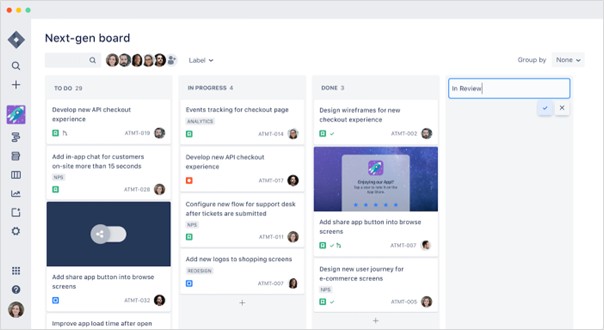
Jira Screen (Source=Atlassian)
✔️ Purpose
- Visualize tasks as cards for quick overviews and seamless sharing
- Organize work and track progress flexibly without complex processes
- Instantly set up workflows with simple rules and lightweight structures to support action-oriented collaboration
✔️ Features
- Simple, intuitive interface centered around cards, lists, and boards
- Wide applicability: from personal to-do lists to startup projects and meeting agendas
- Start instantly without structural design (e.g., create a board within seconds after signing up)
- Extend functionality with Power-Ups and external app integrations (calendars, documents, chat, etc.)
✔️ Ideal Team Profiles
- Preferred by P(Perceptive) / FP-type teams
- Teams favoring flexible approaches, spontaneous collaboration, and simple workflows
- Organizations prioritizing flexibility, speed, and visual organization over rigid rules
✔️ Ideal Scenarios
- Non-development teams (content, marketing, planning, design, etc.) needing rapid task visualization
- Lightweight project management for to-dos, idea organization, campaign planning
- Small teams without complex approval processes or strict role distinctions
- Simple task management for personal schedules, side projects, etc.
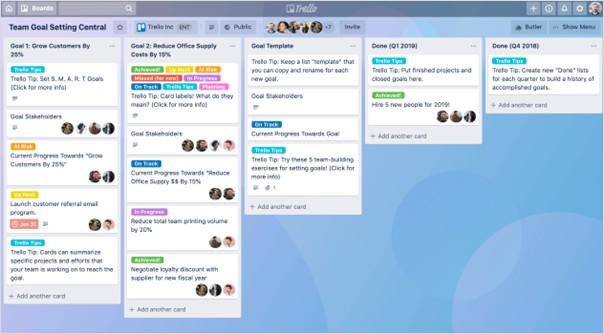
Trello Screen (Source=Atlassian)
While Jira and Trello are each optimized for different purposes and work styles, combining the two tools can create greater operational efficiency than relying on a single solution. By using Jira and Trello together, organizations gain a flexible structure that allows them to choose the most suitable execution method based on the nature and complexity of the work. For example, teams can quickly organize ideas and handle initial tasks in Trello, then naturally transition to Jira for stages requiring more precise management and tracking. The more diverse a team's size and roles, the more powerful the combined use of both tools becomes. This approach provides balanced improvements in team productivity, collaboration speed, and execution capability, delivering organizational leverage difficult to achieve with a single tool.
✔️ Unified cross-departmental collaboration:
Connecting Jira and Trello allows business teams and software teams to track progress from the same information base, making cross-departmental communication significantly faster and clearer.
✔️ Ideas turn into action instantly:
When ideas organized in Trello move into the actual development phase, sending the card to Jira seamlessly connects it to the production process, ensuring a smooth transition from planning to execution.
✔️ Real-time, transparent progress tracking:
Instantly view the latest status of Jira tickets directly on Trello boards, ensuring all stakeholders always share updated information.
Collaboration tools aren't about superiority. The key is ‘how does our team perform best?’ Therefore, the starting point for selection isn't feature comparison, but accurately understanding the team's work style. Building on this foundation, designing Jira, Trello, or a combination of both tools will establish a more robust system for team productivity, cross-departmental collaboration, and decision-making speed.
Establishing this collaborative culture within an organization requires a systematic approach, from initial design through the optimization process. Leveraging over 3,260 projects of unparalleled IT project experience and expertise, PLATEER—as Atlassian's first and largest partner in Korea—provides customized solutions throughout the entire process: from tool implementation and operation to training and optimization. If you're considering implementation, contact us now!

▶ Contact Us [Click]
Source
※ Recommended reading!
Jira vs. Trello: Which is a better fit for our team? [Click]
Curious about Jira? Get up to speed fast with this one article [Click]
Did you like today's content?
Subscribe to the PLATEER newsletter!
We'll send you curated content from PLATEER right to your inbox.
12.jpg)


